

ACP-520 Certification Exam Dumps Questions in here [May-2024]
Updated ACP-520 Exam Practice Test Questions
NEW QUESTION # 30
Laura went to Add People from within Jira.
She chose to invite Arjun to join Jira Software and Jira Service Management.
Arjun was able to join one of the products immediately but needed admin approval for the other.
What accounts for this difference?
- A. The "Invite anyone" setting is configured for one of the products but not the other.
- B. Arjun's email address is unverified in one of the products but not the other.
- C. Laura is a Jira admin for one of the products but not the other.
- D. Laura's email address is unverified in one of the products but not the other.
- E. Laura is on the same site as one of the products but not the other.
Answer: A
Explanation:
Explanation
The "Invite anyone" setting allows users to invite anyone to join a product without admin approval. If this setting is enabled for one product but not the other, then Arjun can join the former product immediately but will need admin approval for the latter product.
ReferencesInvite anyone to your site Specify how users get site access
NEW QUESTION # 31
Your organization has multiple sites and Ann is a user.
The domain of Ann's email address is not verified.
What is possibly true about Ann's account?
- A. She has a managed account in one of your sites.
- B. She has a managed account in another organization.
- C. You can enforce two-step verification on her account.
- D. You can delete her account.
- E. You can deactivate her account.
Answer: B
Explanation:
Explanation
If Ann's email domain is not verified by your organization, it means that you do not own or manage her account. However, she may have a managed account in another organization that has verified her domain. In that case, you cannot enforce security policies, deactivate, or delete her account12.
References:
Verify a domain to manage accounts
Solved: Verify domain - Missing accounts
NEW QUESTION # 32
You can perform various actions on a single managed account.
One action can only be performed for all managed accounts from a particular verified domain and not just for one single account.
Identify that action.
- A. convert to unmanaged
- B. add to an authentication policy
- C. revoke API tokens
- D. deactivate account
- E. enforce two-step verification
- F. view discovered products
Answer: A
Explanation:
Explanation
Converting a managed account to an unmanaged account requires changing the email address of the account to a domain that is not verified by the organization. This action can only be done for all accounts from a verified domain, not for individual accounts.
https://support.atlassian.com/user-management/docs/make-changes-to-a-managed-user-account/
NEW QUESTION # 33
Review the users and roles below.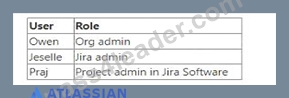
Which statement is true?
- A. Jeselle can make Praj a Jira admin.
- B. Owen and Jeselle can remove users from Jira Software.
- C. Jeselle and Praj can configure the User invites setting for Jira Software.
- D. Owen and Jeselle can generate Invitation links for Jira Software.
- E. Owen can make Praj an org admin.
Answer: E
Explanation:
Explanation
According to the Atlassian Cloud Organization Admin ACp-520 documents and learning resources, only an org admin can make another user an org admin. In this case, Owen is the only org admin, so he is the only one who can make Praj an org admin.
https://community.atlassian.com/t5/Training-Certification-articles/How-to-prepare-for-ACP-520-Atlassian-Cloud
https://support.atlassian.com/organization-administration/docs/learn-about-atlassian-organizations/
NEW QUESTION # 34
Foogie performed the following task.
He navigated to the Project Role Browser and set a default group in the Developers project role.
What admin privileges does Foogie definitely have?
- A. Product admin role for Confluence
- B. site admin role
- C. org admin role
- D. project admin role
- E. Product admin role for Jira Administration
Answer: B
Explanation:
Explanation
To access the Project Role Browser and set a default group for a project role, Foogie must have the Administer Jira global permission, which is granted by the site admin role1. The product admin role for Jira Administration does not have this permission2. The project admin role can only manage project role members for specific projects, not the default members3. The product admin role for Confluence and the org admin role are irrelevant for this task.
References: Manage project roles, Jira Cloud site and product administration, Project permissions
NEW QUESTION # 35
You separated the group "engineers" into two new groups and then deleted the original group.
As a result, Joe and John had four problems in Jira.
Which problem did not occur?
- A. They could no longer edit their own comments.
- B. They could no longer view the billing history.
- C. They could no longer view some dashboards.
- D. They could no longer select other users in dropdown fields.
- E. They could no longer transition issues.
Answer: B
Explanation:
Explanation
The problem that did not occur for Joe and John is that they could no longer view the billing history. This is because the billing history is not related to the groups or permissions in Jira, but to the organization and site administration. Only the organization admin or the billing contact can view the billing history for the products and subscriptions12 The other problems could have occurred for Joe and John if the group "engineers" had specific permissions or roles in Jira that were not granted to the new groups. For example, if the group "engineers" had the Browse Users global permission, they could select other users in dropdown fields, such as assignee or reporter. If the group "engineers" had the View Dashboard project permission, they could view some dashboards that were shared with the project. If the group "engineers" had the Edit Own Comments issue permission, they could edit their own comments on issues. If the group "engineers" had the Transition Issues issue permission, they could transition issues from one status to another345 References = View your billing history, Manage your bill for Standard and Premium plans, Manage global permissions, Manage project permissions, Manage project roles
NEW QUESTION # 36
Your organization has multiple products. You need a count of billable users only for Jira Software, which is on a monthly subscription of the Standard plan on your site "acme.atlassian.net".
Where can you find this information?
- A. Directory > Managed accounts > Total
- B. Directory > Users > Active users
- C. Billing > Jira Software "acme.atlassian.net" > Users
- D. Directory > Users > Total users
- E. Groups > "jira-software-users-acme" > Members
Answer: C
Explanation:
Explanation
The Billing page shows you the number of billable users for each product on your site, as well as the user tier and the monthly cost. You can filter by product and site to see the specific details for Jira Software on
"acme.atlassian.net".
References:
How to prepare for ACP-520: Atlassian Cloud Organization Admin Certification, section "Manage product subscriptions & billing" Manage your bill for Standard and Premium plans, subsection "View your bill"
NEW QUESTION # 37
There are several methods to grant Confluence product access to new users, with or without admin approval.
One of those methods never requires admin approval.
Identify that method.
- A. approved domains
- B. invitation links
- C. anonymous access
- D. allowlist
- E. user invites
Answer: C
Explanation:
Explanation
Anonymous access is a method to grant Confluence product access to new users without requiring admin approval or an Atlassian account. Users can view public spaces and pages in Confluence without logging in.
However, anonymous access does not allow users to edit, comment, or create content in Confluence.
NEW QUESTION # 38
You went to the pricing page for one of the Cloud products and started a site with a Premium subscription trial to that product.
You used your work email address, "[email protected]".
What was definitely created?
- A. Preview track
- B. "site-admins" group
- C. sandbox
- D. Jira Administration product
- E. "malamute.edu" approved domain
Answer: B
Explanation:
Explanation
When you start a site with a Premium subscription trial to a Cloud product, you automatically create a
"site-admins" group that contains your account as the only member. The "site-admins" group has the site admin role, which allows you to manage the site settings, products, users, and groups. You can also add other users to the "site-admins" group if you want to delegate some of the site administration tasks.
References = Create and update groups and Manage site-level permissions
NEW QUESTION # 39
A secure pathway needs to be configured between a self-managed Jira Software instance and several Atlassian Cloud products.
Identify one configuration step that must be done in a self-managed instance.
- A. create an IP allowlist
- B. create an application tunnel
- C. generate a security key
- D. add an upstream port
- E. configure multiple application tunnels
Answer: D
Explanation:
Explanation
Adding an upstream port is one of the configuration steps that must be done in a self-managed instance to enable a secure pathway between a self-managed Jira Software instance and several Atlassian Cloud products.
An upstream port is the port on your self-managed instance that receives traffic from the application tunnel.
You need to configure the upstream port for each product that you want to connect to the tunnel.
References = Configure required connections and upstream ports and Create an application tunnel to your self-managed instance
NEW QUESTION # 40
Your site currently only has Confluence and product access is granted to these 3 groups, among others:
. confluence-users
. confluence-admins
. site-admins
You have just added the Jira Software product to the site and are configuring its product access.
Which action is NOT possible?
- A. Make "confluence-admins" a default group for Jira Software.
- B. Grant "confluence-admins" the Product admin role for Jira Administration.
- C. Make "confluence-users" a default group for Jira Software.
- D. Make "site-admins" a default group for Jira Software.
- E. Grant "site-admins" the Product admin role for Jira Administration.
Answer: B
Explanation:
Explanation
The Product admin role for Jira Administration is only available for groups that have access to Jira Software1.
The "confluence-admins" group does not have access to Jira Software by default, so you cannot grant them this role. You can only grant this role to groups that have the Jira Software User role or the Jira Software Admin role2.
References:
Manage groups
Manage product roles
NEW QUESTION # 41
Two of the groups in your organization include:
. jira-software-users-acme
jira-admins-acme
Which statement is definitely true?
- A. Your organization has the Jira Software product.
- B. The groups are not used to grant org admin privileges.
- C. The groups are not used to grant Confluence access.
- D. The groups are used for Jira Software product access.
- E. The groups are mutually exclusive.
Answer: A
Explanation:
Explanation
The groups jira-software-users-acme and jira-admins-acme are default groups that are automatically created when you invite users to Jira Software or assign them the Jira admin role in your organization. The suffix acme indicates that the groups belong to the organization with the domain name acme.com. The groups are used to manage product accessand permissions for Jira Software, but they do not imply anything about Confluence access or org admin privileges. Therefore, the only statement that is definitely true is that your organization has the Jira Software product.
References :
Default groups and permissions
Users & Permissions | Jira Software.
NEW QUESTION # 42
You went to the Jira Software product pricing page in order to sign up for a new Atlassian site.
Which statement is true?
- A. You must already have an empty Atlassian organization.
- B. You must enter payment details.
- C. You must use an email address from a non-public domain.
- D. You must enter billing information.
- E. You must be logged into an Atlassian account.
Answer: C
NEW QUESTION # 43
You want to delete a group that is currently used throughout Jira.
Where is the group definitely NOT used?
- A. to hide workflow transitions
- B. to search using the membersOf("") function
- C. to secure the visibility of certain issues
- D. to limit who can make bulk updates
- E. to restrict who can invite teammates to Jira
Answer: E
Explanation:
Explanation
The statement that is true is that the group is definitely not used to restrict who can invite teammates to Jira.
This is because inviting teammates to Jira is a site administration function that is controlled by the site admin role, not by any group. The other statements are false, as the group could be used for those purposes, depending on how the group is configured in the global permissions, the permission schemes, the issue security schemes, or the workflow conditions.
NEW QUESTION # 44
Which statement is false about Cloud organizations?
- A. An organization can have multiple org admins.
- B. An organization can have multiple sandboxes.
- C. An organization can have the same product on different sites.
- D. An organization can have multiple identical site names.
- E. An organization can have different products on the same site.
Answer: D
Explanation:
Explanation
Each site in an organization must have a unique name and URL. You cannot have two sites with the same name or URL in the same organization.
ReferencesAdd a new product to your organization Update a product URL to a new URL
NEW QUESTION # 45
Jack could see several issues. Then an org admin made a change in the admin hub.
Now Jack can no longer see those same issues, but he can see others.
Where in the admin hub was the change made?
- A. security
- B. groups
- C. managed accounts
- D. permission schemes
- E. user access settings
Answer: D
Explanation:
Explanation
Permission schemes control who can see and do what in Jira projects. If the org admin changed the permission scheme for the project that Jack was working on, it could affect his visibility and access to the issues.
References:
How to prepare for ACP-520: Atlassian Cloud Organization Admin Certification, section "Users and Groups" Manage project permissions
NEW QUESTION # 46
An application tunnel was just configured and its status is Connected.
Where does it reside?
- A. between a single Cloud product and two Data Center instances
- B. between two Cloud products on a single Cloud site within an organization
- C. between two Cloud products and a single Data Center instance
- D. between two Cloud products on two Cloud sites in different organizations
- E. between two Cloud products on two Cloud sites within the same organization
- F. between two Cloud products and two Data Center instances
Answer: C
Explanation:
Explanation
Application tunnels provide a secure pathway between your Atlassian cloud organization and Data Center or Server instances that live in your network. You can link only one such organization (and its multiple products) to a single self-managed instance, for example Confluence Data Center.
References: What are application tunnels?, Application tunnels overview
NEW QUESTION # 47
A new access request was just made by Beth.
She requested that Drew be granted access to Jira Software.
Which statement is definitely true?
- A. Drew is an existing user on the site.
- B. Beth has the User role for Jira Software.
- C. Drew's email address is verified.
- D. Beth has the Product admin role for Jira Software.
- E. Drew is a new user on the site.
Answer: C
Explanation:
Explanation
The only statement that is definitely true is that Drew's email address is verified. This is because product access requests must be made by a user with a verified email address and Atlassian account1 The other statements are not necessarily true, as they depend on other factors, such as the roles and permissions of Beth and Drew, the existing users on the site, and the self-signup settings2 References = Approve or deny product access requests, Manage product access
NEW QUESTION # 48
Your organization only has Jira Software.
You are viewing a list of names under Directory > Users.
The status for Jim shows as "Invited".
Which statement is definitely true?
- A. Jim's email address has been verified.
- B. Jim belongs to at least one group.
- C. Jim was invited by an org admin.
- D. Jim can be granted the org admin role.
- E. Jim has an Atlassian account.
Answer: E
Explanation:
Explanation
When a user is invited to join a product or site, they automatically get an Atlassian account. The status
"Invited" means that the user has not accepted the invitation yet, but they already have an account created for them.
References:
Accept the invitation to join your service project team
Customer is not receiving invitation emails when invited to a Service Management project
NEW QUESTION # 49
Arun sees two filters that show issues from a particular Jira Software project.
Yesterday, he received two filter subscriptions based on those two filters.
This morning, he can still see all the issues on his agile board, but he only received one of the filter subscriptions.
Identify a possible cause.
- A. His account was deactivated.
- B. His account was suspended.
- C. His product access was revoked.
- D. A product role was deleted.
- E. A group was deleted.
Answer: E
Explanation:
Explanation
If a group that was used to share a filter or a dashboard was deleted, the users who belonged to that group would no longer receive the filter subscriptions or see the dashboard .
References:
[Manage shared filters and dashboards]
[Manage users, groups, permissions, and roles in Jira Cloud]
NEW QUESTION # 50
You are looking at the Jira Service Management product page on the "beta" site.
On this page, product access to Jira Service Management is granted to three groups, as shown.
Which action can the org admin perform on this page?
- A. Remove "hr-managers" from the product.
- B. Remove "jira-servicemanagement-users-beta" from the product.
- C. Make "site-admins" a default group.
- D. Update "jira-servicemanagement-users-beta" so it is not a default group.
- E. Delete "hr-managers" group.
Answer: B
Explanation:
Explanation
The org admin can remove a group from a product, but they cannot update or delete a group, or make a group a default group.
References:
How to prepare for ACP-520 Atlassian Cloud Organization Admin
Learn about Atlassian organizations
NEW QUESTION # 51
You set Jira as the landing product on your site.
Bob is a new user and you granted him product access to Confluence only.
What will happen when Bob logs into the site for the first time?
- A. Bob will be sent a new invitation link for Jira.
- B. Bob will see the default dashboard in Jira.
- C. Bob will be prompted to request access to Jira.
- D. Bob will be added to the default access group for Jira automatically.
- E. Bob will see a landing page in a Confluence space.
Answer: C
Explanation:
Explanation
When Bob logs into the site for the first time, he will be redirected to the landing product, which is Jira.
However, since he does not have product access to Jira, he will see a message that says "You don't have access to this product" and a button that says "Request access". If he clicks on the button, an access request will be generated for Jira, which will need to be approved by a product admin.
ReferencesSet your site's landing product Request access to a product
NEW QUESTION # 52
You just invited Omar to join your site and to Confluence only.
But he reports that he can see Jira projects, as well.
Identify the root cause.
- A. product roles
- B. verified domains
- C. project roles
- D. managed accounts
- E. groups
Answer: E
Explanation:
Explanation
The most likely root cause of Omar being able to see Jira projects is that he belongs to a group that has access to both Confluence and Jira products. Groups are used to manage users who need the same permissions or restrictions, and they can be assigned to multiple products. When you invite a user to join your site and a product, you can also add them to a group that has access to that product. However, if the group also has access to other products, the user will be able to see those products as well. To prevent this, you can either create a new group that only has access to Confluence, or remove the Jira access from the existing group that Omar is in.
References = [Manage groups] and [Give users access to products]
NEW QUESTION # 53
......
Verified ACP-520 dumps Q&As 100% Pass in First Attempt Guaranteed Updated Dump: https://drive.google.com/open?id=1Ns9ZeCdZMJeVmB8PNgGaFhtzPcHn1_nC
Pass ACP-OA ACP-520 Exam With 67 Questions: https://www.pass4leader.com/ATLASSIAN/ACP-520-exam.html